
Containerのプロパティalinmentとは何をするのか紹介します。
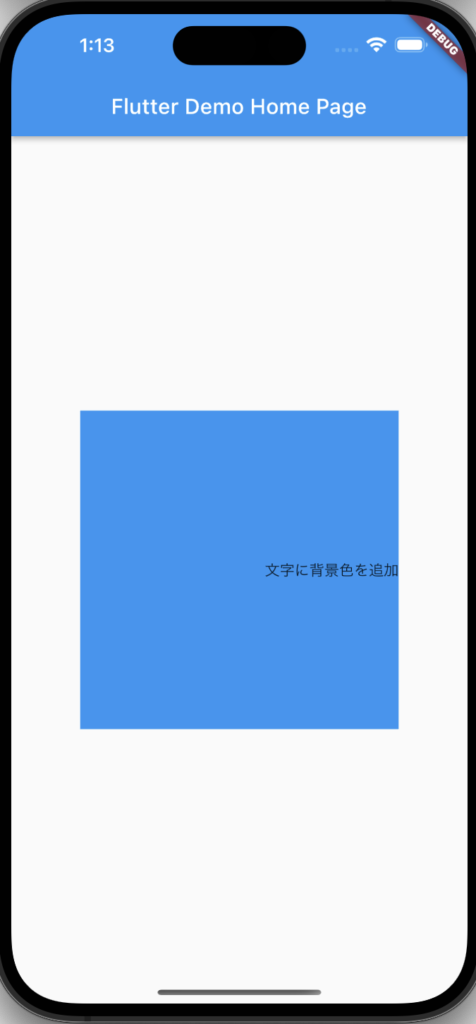
alinmentは子ウィジェットの位置を左寄せや右寄せにすることができます。
イメージ
Alignmentクラス
|
bottomCenter
|
中央下に配置します。 |
|
bottomLeft
|
左下に配置します。 |
|
bottomRight
|
右下に配置します。 |
|
center
|
中央に配置します。 |
|
centerLeft
|
中央左に配置します。 |
|
centerRight
|
中央右に配置します。 |
|
topCenter
|
中央上に配置します。 |
|
topLeft
|
左上に配置します。 |
|
topRight
|
右上に配置します。 |
ソースコード
Container(
  height: 300,
  width: 300,
  color: Colors.blue,
  alignment: Alignment.centerRight,
  child: /* 任意のwidget */,
),
使用例
@override
Widget build(BuildContext context) {
  return Scaffold(
    appBar: AppBar(
      title: Text(widget.title),
    ),
    body: Center(
      child: Column(
        mainAxisAlignment: MainAxisAlignment.center,
        children: <Widget>[
          Container(
            height: 300,
            width: 300,
            color: Colors.blue,
            alignment: Alignment.centerRight,
            child: const Text(
              '文字に背景色を追加',
            ),
          ),
        ],
      ),
    ),
  );
}![[Flutter] hooks_riverpodを導入](https://it-fukuoka.net/wp-content/uploads/2022/10/flutter_logo_v2-150x150.png "[Flutter] hooks_riverpodを導入")
最近のコメント